
On this page
- What is a phishing simulation?
- What are some phishing simulation examples?
- How do you run a fair phishing simulation programme?
- Which phishing simulation metrics matter?
- Consultant-led campaigns or a self-service platform?
- What do PCI DSS, ISO 27001 and Cyber Essentials require?
- Why Sovereign Secure?
- Next step
A phishing simulation is a controlled, authorised exercise in which an organisation sends realistic but harmless phishing messages to its own staff to see who opens them, clicks, enters credentials or reports them. Anyone who falls for one sees a short explanation of the warning signs they missed, and the results show where training and processes need work.
Done well, simulation builds a habit of pausing and reporting. Done badly, it produces a monthly click-rate chart, resentful staff and little change. This guide explains how a phishing simulation works, gives seven phishing simulation examples from easy to hard, and sets out the metrics and rules that make one fair and useful.
Key takeaways
- A phishing simulation measures behaviour, not knowledge, so it works alongside training.
- Scenarios built from your own suppliers, systems and processes reveal far more than generic templates.
- Reporting rate and time to first report matter more than click rate.
- A no-blame culture decides whether staff report real mistakes.
- PCI DSS, ISO 27001 and UK GDPR expect awareness; none mandates simulation, but results are strong evidence.
What is a phishing simulation?
A phishing simulation, or simulated phishing attack, is a fake phishing attack that you run against your own organisation, with permission, to measure how people respond. It is a test of behaviour: not whether staff can define phishing, but whether they spot it and report it when a convincing message lands in a busy inbox.
A typical simulation works like this:
- Design. A scenario is chosen or written, such as a shared document notification or a supplier asking to change bank details.
- Send. The message goes to an agreed group of staff, without warning of the date.
- Teach. Anyone who clicks or enters details sees a short, respectful page explaining the signs they missed.
- Credit. Anyone who reports the message through the normal report button is thanked.
- Report. Results are summarised by team, role and scenario, and used to target training and fix processes.
Phishing is harder to spot than it used to be. Attackers use generative AI to write fluent, targeted messages, so spelling mistakes are no longer a reliable warning sign, and attacks arrive by SMS, phone and collaboration tools as well as email. The NCSC’s phishing guidance recommends layered defences, with staff reporting as one layer rather than the only one. A useful simulation reflects that. Our guide on how to spot phishing emails lists the ten signs that still hold.
What are some phishing simulation examples?
These seven phishing simulation examples run from easier to harder. Each one is illustrative; a good scenario is adapted to your own suppliers, systems and way of working.
| Scenario | Channel | What it tests | Warning signs staff should spot |
|---|---|---|---|
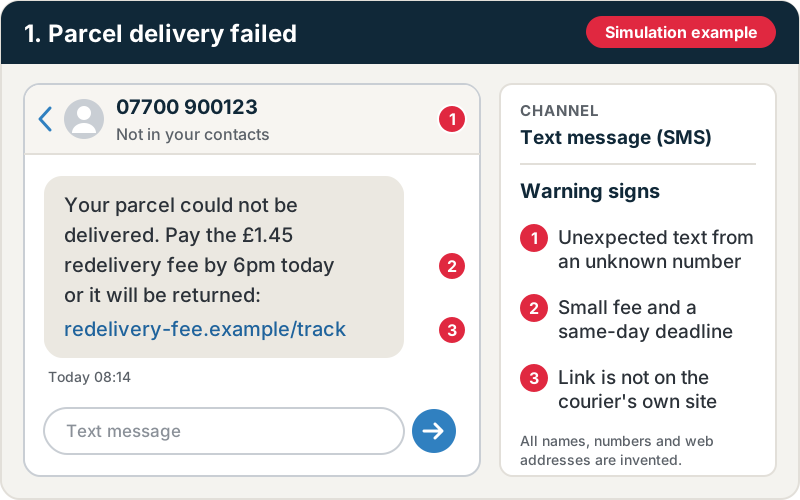
| Parcel delivery failed | Email or SMS | General awareness | Unexpected message, urgency, look-alike link |
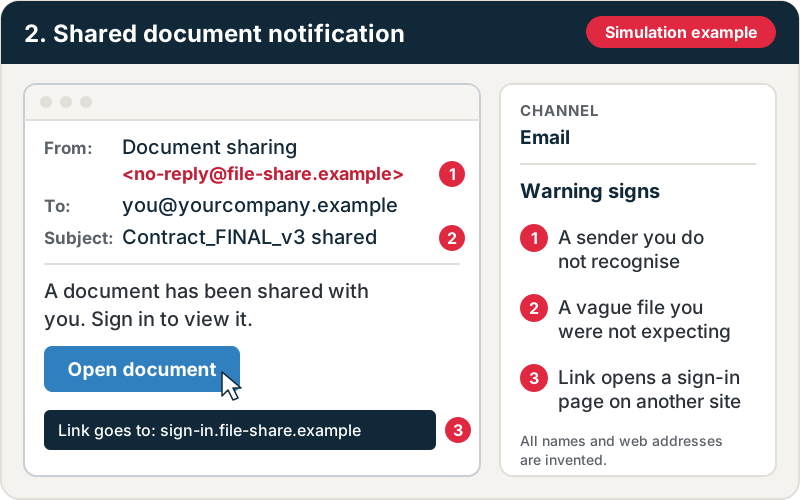
| Shared document notification | Credential entry on a fake Microsoft 365 page | Sender not recognised, sign-in page URL wrong | |
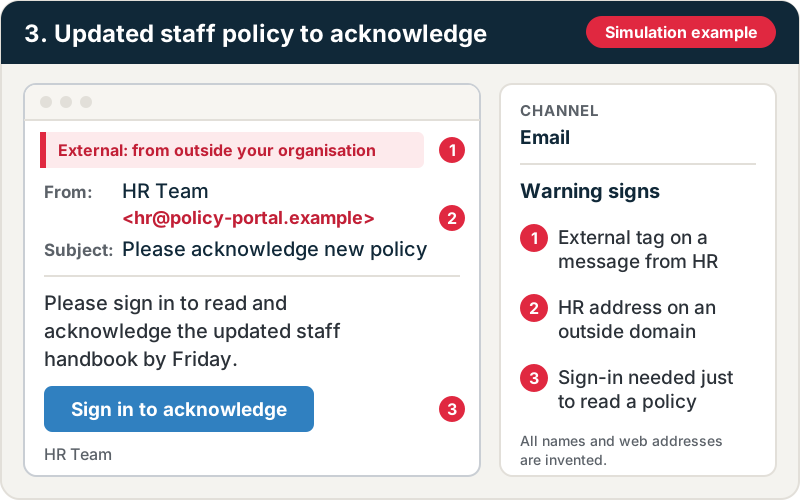
| Updated staff policy to acknowledge | Trust in internal-looking messages | External sender tag, unusual request to sign in | |
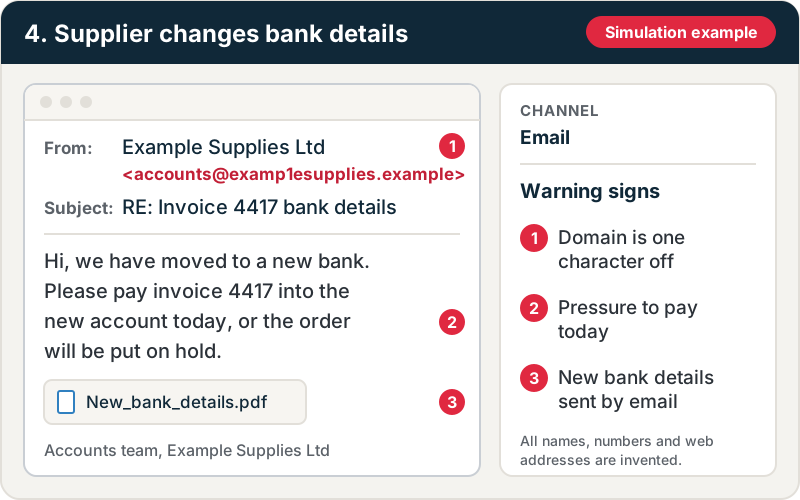
| Supplier changes bank details | Payment verification process | Change request by email, pressure to pay quickly | |
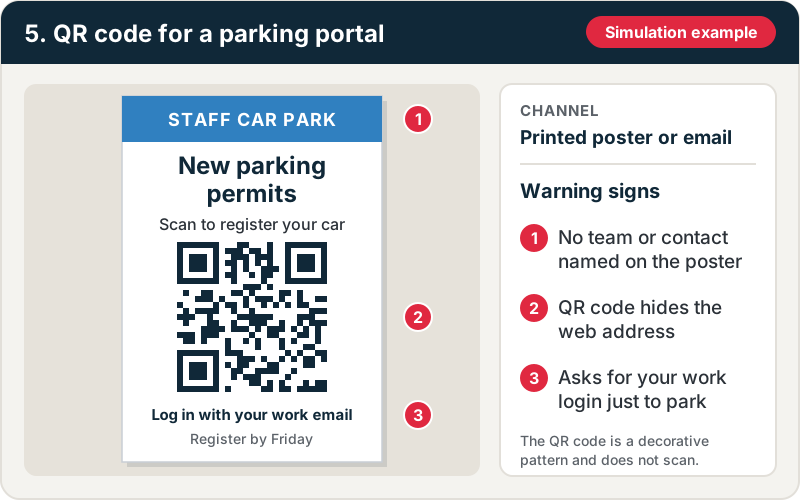
| QR code for a parking or benefits portal | Email or printed | Scanning codes on personal phones | QR code instead of a link, login requested |
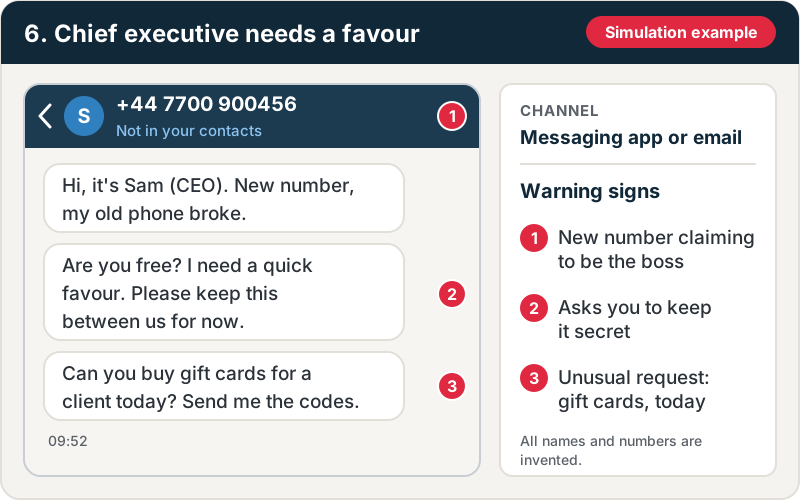
| Chief executive needs a favour | Email or messaging app | Response to authority and secrecy | Unusual request, “don’t tell anyone”, new number |
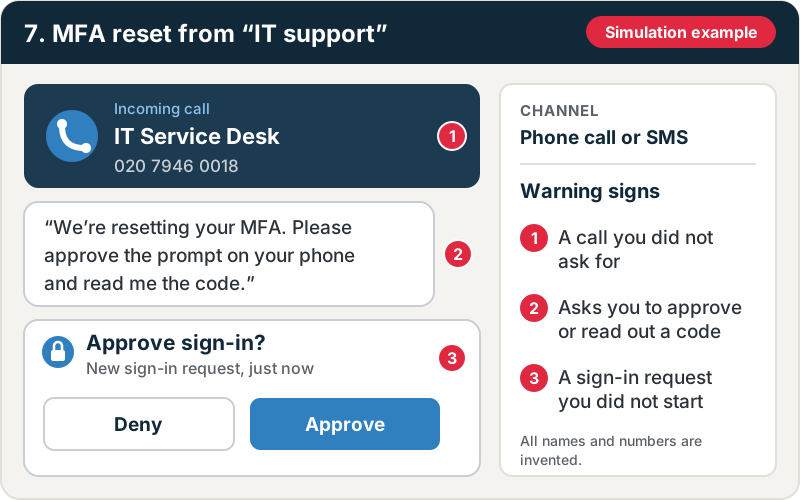
| MFA reset from “IT support” | Phone or SMS | Helpdesk and MFA approval habits | Unsolicited contact, request to approve a prompt or read out a code |
The mock-ups below show what each lure can look like, with its warning signs numbered. Every name, number and web address in them is invented. Select an image to open it full size.
Our glossary explains the attack types behind several of these lures: smishing, QR code phishing, vishing and business email compromise.
Increase difficulty over time, and time some campaigns around real events such as year-end or a publicised company announcement. Avoid lures that exploit distressing topics, such as pay cuts, redundancies, bereavement or health scares.
How do you run a fair phishing simulation programme?
- Set objectives. Decide what you want to learn: a baseline across the organisation, whether finance follows payment verification, or whether a recent course changed behaviour.
- Agree the rules. Involve senior leadership and HR. Decide in advance which scenarios are off limits, how results are reported and what happens to repeat clickers. The answer should be more support, not discipline.
- Be transparent. Tell staff that simulations happen, without announcing when. Explain the programme in your staff privacy information, because the results are personal data.
- Start with a baseline. Prioritise higher-exposure roles: finance, HR, IT administrators, executive assistants and anyone who can approve payments.
- Make reporting easy. A single report button in the email client, and thanks for everyone who uses it, including people who report after clicking.
- Repeat and vary. Change scenarios, timing and difficulty so staff respond to the content of each message rather than learning to spot the test, and run an extra exercise after significant changes such as a new finance system or a merger. How often to run campaigns is covered on our page on simulated phishing tests.
Which phishing simulation metrics matter?
Click rate is what most dashboards lead with, but on its own it misleads. It varies with scenario difficulty and falls if you simply use easier lures. Better measures are:
- Reporting rate: the share of recipients who report the message properly. This is the behaviour you want.
- Time to first report: in a real attack, an early report lets the security team block the message and warn others.
- Credential submission rate: clicking is a risk; typing a password is a much bigger one.
- Trends by role and scenario: which teams and lure types consistently cause problems.
Short, relevant training straight after a failed simulation usually works better than a long annual course. Our guide to cyber security awareness training covers the wider programme simulations should sit within.
Consultant-led campaigns or a self-service platform?
If you buy simulations from a provider, look for research into your organisation, scenarios across the channels attackers use, delivery that does not weaken your email filters, credit for reporting and careful handling of results. Our phishing simulation page sets out what a campaign should include. The bigger choice is how campaigns are delivered.
Many organisations use a self-service platform for routine campaigns. If you use Microsoft 365, you may already have one: Attack simulation training is part of Microsoft Defender for Office 365 Plan 2, which licences such as Microsoft 365 E5 include. That can work, but it has limits.
| Approach | Strengths | Weaknesses | Best for |
|---|---|---|---|
| Self-service platform | Cheap per campaign, easy to run monthly | Generic templates staff learn to recognise; dashboards without interpretation | Regular, low-level awareness |
| Consultant-led campaign | Researched, organisation-specific scenarios; results interpreted against your processes | Costs more per campaign | Baselines, high-risk roles, testing a specific process |
| Combined | Platform for routine campaigns, consultant-led exercises periodically | Two relationships to manage | Most mid-sized organisations |
A lure about a supplier invoice discrepancy tells you far more about your finance team than a generic parcel delivery notice. Consultant-led exercises often form part of wider social engineering testing, which can add phone and on-site scenarios. Our guide to the types of social engineering attacks explains the other routes attackers use.
What do PCI DSS, ISO 27001 and Cyber Essentials require?
| Framework | What it requires | Where simulation helps |
|---|---|---|
| PCI DSS v4.0.1 | Anti-phishing mechanisms (5.4.1); awareness training on hire and at least annually (12.6.3), covering phishing and social engineering (12.6.3.1) | Evidence that training changes behaviour |
| ISO/IEC 27001:2022 | Information security awareness, education and training (Annex A 6.3) | Evidence for the control and input to management review |
| UK GDPR | Appropriate organisational measures (Article 32) | Shows staff can recognise and escalate a breach |
| Cyber Essentials Plus | Technical tests of malware delivered by email and web | Not covered: the audit tests defences, not staff behaviour |
The PCI DSS requirements are published in the PCI SSC document library. If you process card payments, your QSA will ask for training records, and our PCI DSS compliance services cover this as part of assessment and readiness work.
Why Sovereign Secure?
Sovereign Secure is a PCI SSC Qualified Security Assessor (QSA) company, ISO 27001 certified and an IASME-licensed Cyber Essentials certification body. We design phishing campaigns around the controls your auditors will ask about, and report results in terms your board and your assessors can use.
Next step
If you want campaigns run for you, our phishing simulation service runs researched campaigns and reports what to change. Phishing is one part of wider social engineering penetration testing, which adds voice scenarios where they are in scope. For a full attack simulation that combines phishing with technical attack paths, see our red team assessments.
Free tools and services
- Phishing simulationRealistic email, QR code and vishing campaigns, reported by team rather than by name.See phishing simulation
- Social engineeringPhishing, phone and on-site pretext tests that show how your staff respond.See how we test
- Scope your testChoose your channels online to scope a phishing or social engineering test.Scope your test